项目 / CTFd/CTFd
CTFd/CTFd
行业推荐
语言 Python标签 ctfsecurityeducationflaskctfd数据更新 2026-11-24 06:50:13 · 仓库 2026-11-23
一段话介绍
用来举办 Capture The Flag 比赛的开源平台,强调易用和可定制,可在管理界面创建题目、分类、提示和校验条件,并支持个人赛或组队赛及计分榜。可使用[托管服务](https://ctfd.io/pricing/),或按[部署文档](https://docs.ctfd.io/docs/deployment/installation)自行安装;也可用 Docker 启动后在本机查看,演示见[demo.ctfd.io](https://demo.ctfd.io/)。本页只写用途与入口,不介绍攻击、利用或赛题解法。
本站整理,非 GitHub 官方 description。
官方 description(GitHub API 原样)CTFs as you need them
6,922累计星
2,796Fork
—峰值日增
0上榜次数
官方快照(gh_history.db,2026-11-25):总榜 未进 Top50 · 日榜 未进 Top50 · 周榜未满 7 天基线(官方不生成) · 月榜暂无官方口径;下方四卡为站内趋势聚合(周卡按上榜次数,非官方 7 日增量窗)。
智能题库与自动阅卷
适配系统:考试系统、题库系统 · 得分 3.0
CTF/竞赛平台,可作校内竞赛、考试与自动评分底座。
更多信息
以下三段按该项目自己的 GitHub README 章节摘录(可合理截断并标明);README 没有对应章节的留空,不编造。
我的用法
CTFd 自托管时可在源码仓库使用 Docker Compose 启动服务。
特点或设计要点
CTFd 支持从管理界面创建挑战与提示、动态计分和插件,提供个人/团队竞赛、冻结计分、上传文件到 S3、自动暴力破解保护、SMTP/Mailgun 邮件及自动赛事起止。
星标走势还差一天的数据,明天就能看到曲线
每天 10:30 记一次星标,连续两天后自动生成曲线
GitHub 项目主页介绍
来自 GitHub 仓库 README / 主页介绍正文,原样摘录,共 3,557 字节。
# 


[](https://docs.ctfd.io)
## What is CTFd?
CTFd is a Capture The Flag framework focusing on ease of use and customizability. It comes with everything you need to run a CTF and it's easy to customize with plugins and themes.
## Features
- Create your own challenges, categories, hints, and flags from the Admin Interface
- Dynamic Scoring Challenges
- Unlockable challenge support
- Challenge plugin architecture to create your own custom challenges
- Static & Regex based flags
- Custom flag plugins
- Unlockable hints
- File uploads to the server or an Amazon S3-compatible backend
- Limit challenge attempts & hide challenges
- Automatic bruteforce protection
- Individual and Team based competitions
- Have users play on their own or form teams to play together
- Scoreboard with automatic tie resolution
- Hide Scores from the public
- Freeze Scores at a specific time
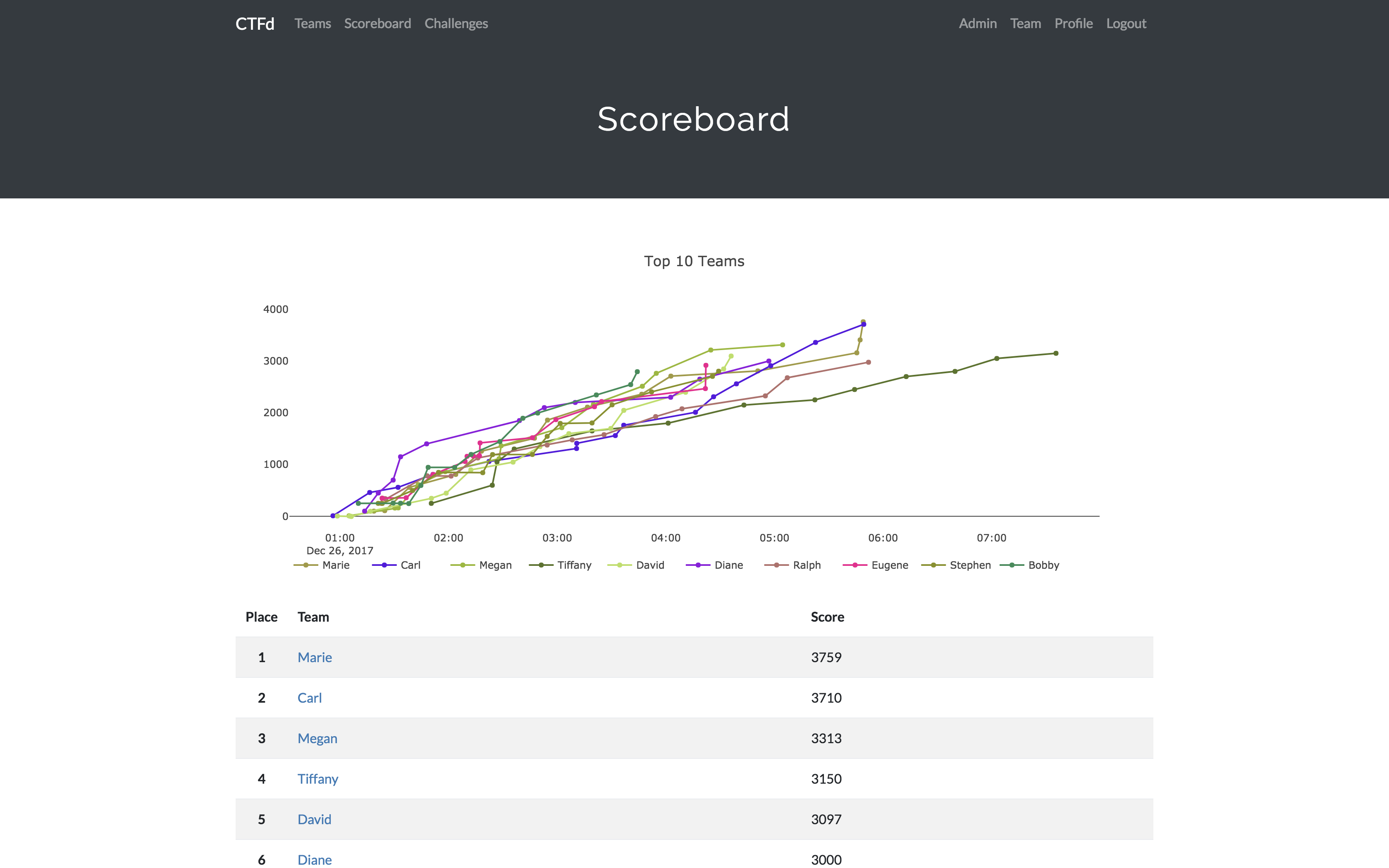
- Scoregraphs comparing the top 10 teams and team progress graphs
- Markdown content management system
- SMTP + Mailgun email support
- Email confirmation support
- Forgot password support
- Automatic competition starting and ending
- Team management, hiding, and banning
- Customize everything using the [plugin](https://docs.ctfd.io/docs/plugins/overview) and [theme](https://docs.ctfd.io/docs/themes/overview) interfaces
- Importing and Exporting of CTF data for archival
- And a lot more...
## Install
The easiest way to get started is to use a [Hosted CTFd instance](https://ctfd.io/pricing/).
For self-hosted installations, check out the [CTFd docs](https://docs.ctfd.io/) for [deployment options](https://docs.ctfd.io/docs/deployment/installation) and the [Getting Started](https://docs.ctfd.io/tutorials/getting-started/) guide.
Below is a summary of a few options for self-hosting CTFd:
### Docker
You can use Docker Compose with the following command from the source repository:
`docker compose up`
To use the auto-generated Docker images directly:
`docker run -p 8000:8000 -it ctfd/ctfd`
### Development
1. Install [uv](https://docs.astral.sh/uv/getting-started/installation/) and run `uv sync` to create a virtualenv with the dependencies installed.
- You can also install into an existing environment with `pip install -r requirements.txt`, which is generated from `uv.lock`.
2. Modify [CTFd/config.ini](https://github.com/CTFd/CTFd/blob/master/CTFd/config.ini) to your liking.
3. Use `uv run serve.py` or `uv run flask run` in a terminal to drop into debug mode.
## Live Demo
https://demo.ctfd.io/
## Support
If you prefer commercial support or have a special project, feel free to [contact us](https://ctfd.io/contact/).
## Managed Hosting
Looking to use CTFd but don't want to deal with managing infrastructure? Check out [the CTFd website](https://ctfd.io/) for managed CTFd deployments.
## Credits
- Logo by [Laura Barbera](http://www.laurabb.com/)
- Theme by [Christopher Thompson](https://github.com/breadchris)
- Notification Sound by [Terrence Martin](https://soundcloud.com/tj-martin-composer)
