项目 / HugeCatLab/ChatTutor
HugeCatLab/ChatTutor
行业推荐
语言 Vue标签 aiai-educationeducationllmstem数据更新 2026-11-24 06:50:13 · 仓库 2026-11-23
一段话介绍
带电子白板能力的可视化交互式 AI 教师,用来在对话之外借助教学工具讲解知识,尤其面向 STEM 场景。可打开 [chattutor.app](https://chattutor.app) 使用,并在[设置页](https://chattutor.app/settings)填写自己的 API 密钥和模型;也可按[中文说明](https://github.com/HugeCatLab/ChatTutor/blob/main/README_CN.md)克隆仓库后,用 Docker Compose 或 Node / Bun 自行部署。
本站整理,非 GitHub 官方 description。
官方 description(GitHub API 原样)👨🏫 ChatTutor: Visual and Interactive AI Tutor
1,332累计星
192Fork
—峰值日增
0上榜次数
官方快照(gh_history.db,2026-11-25):总榜 未进 Top50 · 日榜 未进 Top50 · 周榜未满 7 天基线(官方不生成) · 月榜暂无官方口径;下方四卡为站内趋势聚合(周卡按上榜次数,非官方 7 日增量窗)。
大模型应用工程化与评测
适配系统:AI 应用平台、模型评测平台 · 得分 1.2
提供模型接入、编排与效果评测能力,可作为行业 AI 应用的工程底座与质量闸门。
更多信息
以下三段按该项目自己的 GitHub README 章节摘录(可合理截断并标明);README 没有对应章节的留空,不编造。
我的用法
ChatTutor 通过 .env 配置数据库、API 与客户端地址、AI 模型及供应商(支持 OpenAI、Anthropic、DeepSeek)、OSS 图床等环境变量。
特点或设计要点
界面提供数学画板和思维导图等教学工具;技术栈包括 GeoGebra、Vue 和 AI SDK。自行部署时需配置 PostgreSQL 连接,以及 OpenAI、Anthropic 或 DeepSeek 等模型服务的密钥。Docker 方式要求 Docker 24 和 Compose 2.22 及以上:复制 `.env.example` 后在 `docker` 目录执行 `docker compose up -d`。也可用 Node.js 20、Bun 1.2 和 pnpm 9.1 及以上在本地开发或构建。
星标走势还差一天的数据,明天就能看到曲线
每天 10:30 记一次星标,连续两天后自动生成曲线
GitHub 项目主页介绍
来自 GitHub 仓库 README / 主页介绍正文,原样摘录,共 5,258 字节。
<div align="right">
<span>[<a href="./README.md">English</a>]<span>
</span>[<a href="./README_CN.md">简体中文</a>]</span>
</div>
<div align="center">
<img src="./assets/logo.png" alt="ChatTutor" width="150" height="150" />
<h1>ChatTutor</h1>
<p>Visual and Interactive AI Tutor</p>
<div align="center">
<img src="https://img.shields.io/github/package-json/v/HugeCatLab/ChatTutor" alt="Version" />
<img src="https://img.shields.io/github/license/HugeCatLab/ChatTutor" alt="License" />
<img src="https://img.shields.io/github/stars/HugeCatLab/ChatTutor?style=social" alt="Stars" />
<img src="https://img.shields.io/github/forks/HugeCatLab/ChatTutor?style=social" alt="Forks" />
<img src="https://img.shields.io/github/last-commit/HugeCatLab/ChatTutor" alt="Last Commit" />
<img src="https://img.shields.io/github/issues/HugeCatLab/ChatTutor" alt="Issues" />
</div>
</div>
---
> [!NOTE]
>
> Online Website: ChatTutor is available at [https://chattutor.app](https://chattutor.app), please set your own API key and models in the settings. ([https://chattutor.app/settings](https://chattutor.app/settings))
ChatTutor is an AI teacher equipped with the ability to use an electronic whiteboard.
Traditional chatbots interact with users primarily through text, which is sufficient in most scenarios. However, with the development of LLM in recent years, more and more people are using AI to assist their learning. In a real-world classroom, teachers have many teaching tools—chalk, computers, blackboards, and other teaching aids—that help students better understand knowledge. But for a chatbot, text can convey very limited information, especially in STEM subjects.
ChatTutor effectively solves this problem by bringing all the teaching tools used in real-world educational scenarios to the forefront, allowing users to interact with them through electronic devices. We've empowered AI with the ability to use these tools, enabling AI to become a truly hands-on teacher.
## Features
##### Math Canvas
<table>
<tr>
<td>
<img src="./assets/demo-math-1.png" alt="Math Canvas" width="100%" />
</td>
<td>
<img src="./assets/demo-math-2.png" alt="Math Canvas" width="100%" />
</td>
</tr>
<tr>
<td>
<img src="./assets/demo-math-3.png" alt="Math Canvas" width="100%" />
</td>
<td>
<img src="./assets/demo-math-4.png" alt="Math Canvas" width="100%" />
</td>
</tr>
</table>
##### Mindmap
<table>
<tr>
<td>
<img src="./assets/demo-mermaid-1.png" alt="Mindmap" width="100%" />
</td>
<td>
<img src="./assets/demo-mermaid-2.png" alt="Mindmap" width="100%" />
</td>
</tr>
</table>
## Quick Start
<details><summary>Environment Variables</summary>
### Database Configuration
- `DATABASE_URL`: PostgreSQL connection string
### Server & Client
- `VITE_API_BASE_URL`: Base URL for the API server (e.g., `http://localhost:8002`)
- `CLINET_BASE_URL`: Base URL for the client application (e.g., `http://localhost:8001`)
### AI Configuration
- `MODEL_API_KEY`: Your API key for the AI service (e.g., `your_api_key_here`)
- `MODEL_BASE_URL`: Base URL for the AI service (optional, defaults to OpenAI)
- `AGENT_MODEL`: Model for the main agent that chats with users (e.g., `gpt-4`)
- `AGENT_MODEL_PROVIDER`: Model provider (options: refer to [Provider Enum](#provider-enum))
- `TITLE_MODEL`: Model for generating chat titles (optional, defaults to `AGENT_MODEL`)
- `TITLE_MODEL_PROVIDER`: Model provider for title generation (optional, defaults to `AGENT_MODEL_PROVIDER`, refer to [Provider Enum](#provider-enum))
#### Provider Enum
- OpenAI: `openai`
- Anthropic: `anthropic`
- DeepSeek: `deepseek`
### OSS Configuration
- `OSS_ENDPOINT`: OSS endpoint URL (if not set, image upload will be unavailable)
- `OSS_ACCESS_KEY`: OSS access key
- `OSS_SECRET_KEY`: OSS secret key
- `OSS_BUCKET`: OSS bucket name
- `OSS_REGION`: OSS region
</details>
<details><summary>Run with Docker</summary>
### Environment
> - Docker >= 24.0.0
> - Docker Compose >= 2.22.0
### Setup
```bash
git clone https://github.com/HugeCatLab/ChatTutor.git
cd ChatTutor
cp .env.example .env
```
### Run
```bash
cd docker
docker compose up -d
```
</details>
<details><summary>Run with Node & Bun</summary>
### Environment
> - Node.js >= 20
> - Bun >= 1.2
> - pnpm >= 9.1.0
### Setup
```bash
git clone https://github.com/HugeCatLab/ChatTutor.git
cd ChatTutor
pnpm i
```
### Development
```bash
pnpm dev
```
Or:
```bash
pnpm client:dev
pnpm web:dev
```
### Build
```bash
pnpm build
pnpm client:start
pnpm web:start
```
</details>
## Tech Stacks
- [Geogebra](https://www.geogebra.org/)
- [Vue](https://vuejs.org/)
- [Vite](https://vitejs.dev)
- [ElysiaJs](https://https://elysiajs.com/)
- [AI SDK](https://ai-sdk.dev/)
## Sponsors
Our sponsors are listed as follows (in no particular order):
- [AiHubMix](https://aihubmix.com/): Open model hub for AI.
## Star History
[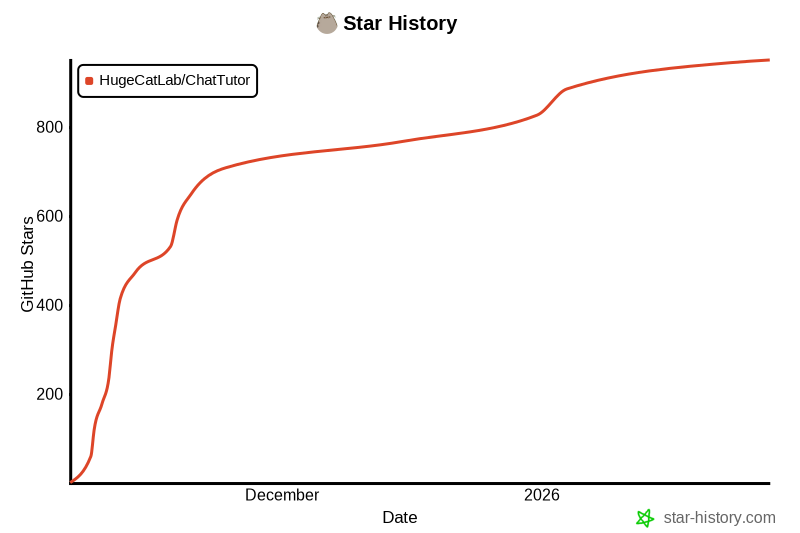](https://www.star-history.com/#HugeCatLab/ChatTutor&type=date&legend=top-left)
---
**AGPL v3 License**
*Copyright (c) 2025 Acbox, All rights reserved.*