项目 / VladSez/easy-invoice-pdf
Free & Open-Source Invoice Generator - No Sign-Up, No Ads, Instant PDF Export, 100% In-Browser, and Fully Customizable Templates.
本站整理,非 GitHub 官方 description。
官方快照(gh_history.db,2026-11-25):总榜 未进 Top50 · 日榜 未进 Top50 · 周榜未满 7 天基线(官方不生成) · 月榜暂无官方口径;下方四卡为站内趋势聚合(周卡按上榜次数,非官方 7 日增量窗)。
以下三段按该项目自己的 GitHub README 章节摘录(可合理截断并标明);README 没有对应章节的留空,不编造。
打开[项目网站](https://easyinvoicepdf.com/)即可开始填写发票,页面会实时预览并支持下载 PDF,不必先注册或安装软件。若要了解原理或功能说明,可再查看站点中的介绍页。源码入口见 [GitHub](https://github.com/VladSez/easy-invoice-pdf)。
表单填写时实时生成 PDF 预览,发票保存在浏览器本地存储,PDF 在设备本地生成,无需服务器保存客户资料。
来自 GitHub 仓库 README / 主页介绍正文,原样摘录,共 15,824 字节。
<div align="center"> <!-- source: .github/screenshots/easy-invoice-logo-readme.png --> <a href="https://easyinvoicepdf.com/?ref=github"> <img src="https://github.com/user-attachments/assets/cb9bcc91-b4c8-40b1-b406-bc606c5d9315" alt="EasyInvoicePDF logo" width="80" height="80"> </a> # EasyInvoicePDF **A free and open-source invoice generator that runs in your browser.** No account, no ads, no limits. Your invoices stay in your browser. [Start invoicing](https://easyinvoicepdf.com/?ref=github) · [How it works](https://easyinvoicepdf.com/how-it-works?ref=github) · [About](https://easyinvoicepdf.com/en/about?ref=github) · [Changelog](https://easyinvoicepdf.com/changelog?ref=github) · [Demo videos](https://www.youtube.com/@vladsazon) <a href="https://easyinvoicepdf.com/?template=stripe"> <!-- source: .github/screenshots/stripe-template.png --> <img width="1920" height="1536" alt="EasyInvoicePDF editor with the Stripe template" src="https://github.com/user-attachments/assets/6f0e2156-24e0-4f8b-b8f1-1d2bf5ac157a" /> </a> </div> ## What is EasyInvoicePDF? EasyInvoicePDF is an invoice editor with a live PDF preview. You fill in a form, the PDF updates as you type, and you download it in one click. Everything happens in your browser. Invoices are saved to your browser's local storage, and PDFs are generated on your device, so there is no server holding your clients' details. <!-- source: .github/demos/easy-invoice-github-demo.gif --> <img src="https://github.com/user-attachments/assets/450fcdc8-32fc-4f41-bc4b-54d6ac96e03c" width="1440" alt="EasyInvoicePDF demo"> ## What can it do? - **Live PDF preview**: see every change as you type, then download in one click - **Two templates**: a classic default layout and a Stripe-style layout, both with logo support - **Flexible taxes**: VAT, GST, sales tax or your own label, calculated automatically - **Item discounts**: take a percentage or a fixed amount off any line - **Saved seller and buyer profiles**: reuse your details across invoices - **Shareable links**: send an invoice as a link instead of an attachment - **Drawn signatures**: sign with a mouse, trackpad or finger, right in the form - **Payment QR codes**: add a payment link, UPI ID or any other text as a QR code - **Multi-page invoices**: long invoices paginate automatically - **10+ languages and 120+ currencies**, with number formats you choose separately from the language - **Works on mobile**: the editor and preview adapt to any screen Read the full [feature list](https://easyinvoicepdf.com/en/about#features). ### Templates | Default template | Stripe template | | :--------------------------------------------------------------------------------------------------------------------------------------------------: | :-------------------------------------------------------------------------------------------------------------------------------------------------: | | <img src="https://github.com/user-attachments/assets/7779cd52-e2a9-442a-8ac8-262387319b3e" width="1200" height="960" alt="Default invoice template"> | <img src="https://github.com/user-attachments/assets/ee8d5337-89fc-461c-b1c1-2680287df514" width="1200" height="960" alt="Stripe invoice template"> | <!-- source: .github/screenshots/default-template.png --> <!-- source: .github/screenshots/stripe-template.png --> ### Feature demos <details> <summary><strong>Live PDF preview</strong>: the PDF updates as you type</summary> <!-- source: .github/demos/live-pdf-preview.gif --> <img src="https://github.com/user-attachments/assets/bddb4b73-630a-4bc5-981b-d470971cd4c6" width="800" alt="Live preview demo"> </details> <details> <summary><strong>Instant PDF download</strong>: one click, ready to print or send</summary> <!-- source: .github/demos/instant-download.gif --> <img src="https://github.com/user-attachments/assets/d85710c5-ac72-4d80-9c43-aeef980d0734" width="800" alt="Instant download demo"> </details> <details> <summary><strong>Language and currency</strong>: switch between 10+ languages and 120+ currencies</summary> <!-- source: .github/demos/lang-currency.gif --> <img src="https://github.com/user-attachments/assets/719f74a1-9be0-4b95-a8c1-a2749246aff3" width="800" alt="Language and currency demo"> </details> <details> <summary><strong>Shareable links</strong>: send an invoice without an attachment</summary> <!-- source: .github/demos/shared-links.gif --> <img src="https://github.com/user-attachments/assets/78f3c560-8dde-4f73-8832-4d74a38a2cee" width="800" alt="Shareable links demo"> </details> <details> <summary><strong>Custom tax labels</strong>: VAT, sales tax, IVA or anything else</summary> <!-- source: .github/demos/tax-custom.gif --> <img src="https://github.com/user-attachments/assets/dab10991-6e76-4851-ab4f-25f52da2b6ed" width="800" alt="Custom tax labels demo"> </details> <details> <summary><strong>QR codes and multi-page PDFs</strong>: payment QR codes and automatic page breaks</summary> <!-- source: .github/demos/qr-code.gif --> <img src="https://github.com/user-attachments/assets/2baf6c39-16a8-47c2-8f08-d03de6d9e593" width="800" alt="QR code and multi-page demo"> </details> ### Demo video A walkthrough of the live preview, the PDF download and the customization options. More videos are on [YouTube](https://www.youtube.com/@vladsazon). https://github.com/user-attachments/assets/d46c6e4e-b78a-4aa1-ab44-d20d6485b682 ## What's new ### v1.0.7: drawn signatures and a redesigned form (November 23, 2026) - **Drawn signatures**: sign with a mouse, trackpad or finger, and the signature prints above the signature line on the default template - **Top line color for the Stripe template**: pick one of six presets or any custom color - **Payment terms in one click**: **7 / 14 / 30 days** buttons set the due date, and moving the date of issue moves the due date with it - **A compact card per item**: chips for common units and tax rates, with **Duplicate** and **Delete** on every item - **Name your own column**: the "Type of GTU" column is now a custom column, such as `Project code`, printed by both templates - **Totals and optional parts as cards**: payment method, QR code and signatures are cards you add with a button and remove in one click [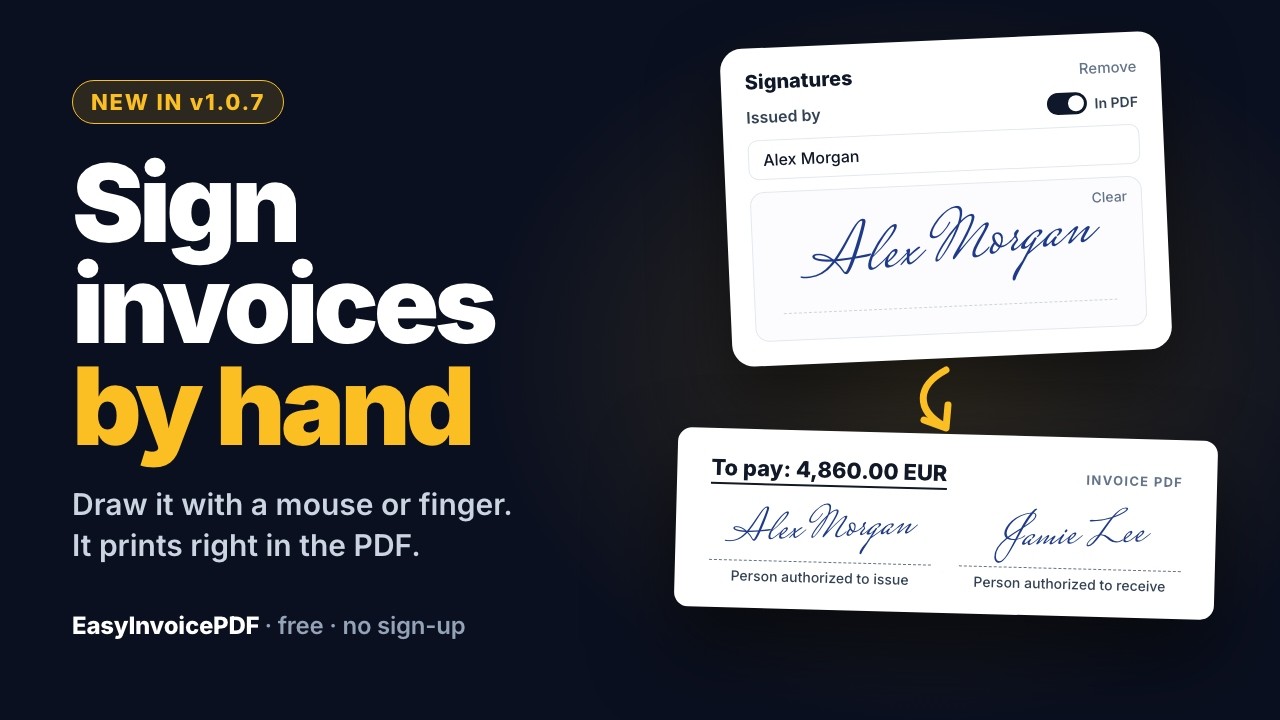](https://www.youtube.com/watch?v=Gc4j3OGRIyA) https://github.com/user-attachments/assets/fcf7567a-5ca6-4227-96ea-97b94d7c11e2 Read the [v1.0.7 release notes](https://easyinvoicepdf.com/changelog/drawn-signatures-and-redesigned-form?ref=github) or the [full changelog](https://easyinvoicepdf.com/changelog?ref=github). <details> <summary><strong>Earlier releases</strong></summary> ### v1.0.6: item discounts (October 20, 2026) - **Discounts on invoice items**: take a percentage (`10%`) or a fixed amount (`50.00 EUR`) off any line - **Your own label**: name the discount, for example `Charitable donation`, and it shows on the invoice - **Tax on the discounted amount**: VAT, totals and the amount in words all use the discounted figures - **Both templates**: a **Discount** column in the default template and a separate discount row in the Stripe template [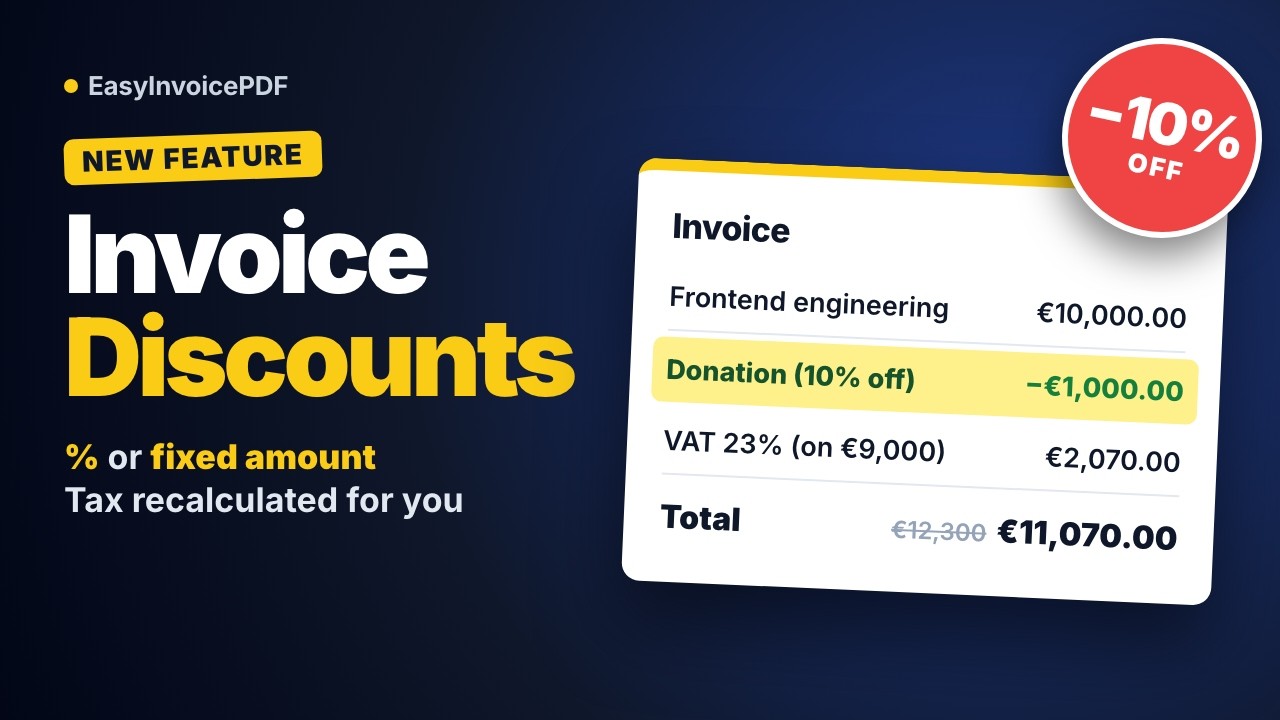](https://www.youtube.com/watch?v=8lYei_9mo6o) [v1.0.6 release notes](https://easyinvoicepdf.com/changelog/item-discounts) ### v1.0.5: number formats and Brazilian Portuguese (September 24, 2026) - **Number format setting**: choose how amounts are punctuated, separately from the invoice language, including a new **International** format (`321 200.00`) - **Keep the format when the language changes**: write an invoice in your client's language and keep your own number formatting - **Brazilian Portuguese invoices**: a new `Portuguese (Brazil)` PDF language with `CNPJ/CPF` and Brazilian amounts in words - **Large amounts fit their columns**: wide amounts wrap at a thousands boundary instead of overlapping the next column [](https://www.youtube.com/watch?v=hZM2DYXo63k) [v1.0.5 release notes](https://easyinvoicepdf.com/changelog/number-format-and-brazilian-portuguese) ### v1.0.4: faster PDF preview and mobile polish (September 4, 2026) - **Faster, flicker-free preview**: the PDF is generated once and shared by the desktop preview, the mobile viewer and the download button - **Redesigned mobile tabs**: a pill-shaped track with one indicator that slides between the form and the preview - **Dates in the form match the PDF**: helper texts and the out-of-date banner use the invoice's language and date format - **Fixed missing first characters in labels**: `Cobrar de` no longer renders as `obrar de` https://github.com/user-attachments/assets/3c87d026-a1c3-4d69-b161-f7d72616c394 [v1.0.4 release notes](https://github.com/VladSez/easy-invoice-pdf/releases/tag/v1.0.4) ### v1.0.3: seller and buyer improvements (March 29, 2026) - **Email visibility toggle**: choose whether seller and buyer email addresses appear on the PDF - **Discard confirmation**: a warning about unsaved changes when you close the seller or buyer dialog - **Reworked seller and buyer forms**: a new layout, locked-state banners and clearer field groups - **Out-of-date dates helper**: lists outdated fields and updates all of them with one button - **Scroll position kept on mobile**: the form returns to where you were when you switch tabs https://github.com/user-attachments/assets/1b39eb6f-e2be-493f-9825-cbce3dc6fa16 [v1.0.3 release notes](https://github.com/VladSez/easy-invoice-pdf/releases/tag/v1.0.3) ### v1.0.2: QR codes and multi-page PDFs (March 10, 2026) - **QR codes**: add payment QR codes with custom descriptions to both templates - **Logo in the default template**: upload a logo to the default template too - **Searchable currency picker**: search by code, symbol or name, grouped by category - **Better multi-page PDFs**: automatic pagination and page breaks for long invoices  [v1.0.2 release notes](https://github.com/VladSez/easy-invoice-pdf/releases/tag/v1.0.2) ### v1.0.1: custom tax labels (January 12, 2026) - **Custom tax labels**: VAT, GST, sales tax or any label, set per invoice language - **Better translations**: tax labels update with the language, and currencies follow the locale - **Stricter VAT validation**: accepts numeric values and specific strings https://github.com/user-attachments/assets/4eef2b90-678b-4a55-9ee5-8fcf195c993a [v1.0.1 release notes](https://github.com/VladSez/easy-invoice-pdf/releases/tag/EasyInvoicePDF-1.0.1) ### v1.0.0: initial release (November 19, 2025) - **Live preview**: the invoice updates as you type - **Instant PDF download**: one click, no sign-up - **Default and Stripe-style templates**: pick the look you want - **Shareable links**: send invoices without attachments - **10 languages and 120+ currencies** https://github.com/user-attachments/assets/23bb5448-c9fb-4ff2-98f3-0b80d75b7683 [v1.0.0 release notes](https://github.com/VladSez/easy-invoice-pdf/releases/tag/EasyInvoicePDF-v1.0.0) </details> <h2 id="self-host">Run it locally</h2> EasyInvoicePDF is licensed under [AGPL v3](#license), so you can run your own copy on your machine or your own infrastructure. You need Node.js and [Corepack](https://nodejs.org/api/corepack.html), which installs the pnpm version pinned in `package.json`. 1. Install pnpm and the dependencies: ```bash corepack enable corepack install pnpm install ``` 2. Create your environment file: ```bash cp .env.example .env.local ``` 3. Start the dev server on [localhost:3000](http://localhost:3000): ```bash pnpm dev ``` ### Environment variables The invoice editor itself needs no external services. These ones are used only by the private `/api/generate-invoice` route and its Telegram bot, which send the author's monthly invoice: | Service | Used for | | ----------------------------------------------------------------------------------- | ----------------------------------------- | | [Resend](https://resend.com/) | Emailing the generated invoice | | [Upstash](https://upstash.com/) | Rate limiting and the job queue | | [Google Drive API](https://developers.google.com/workspace/drive/api/quickstart/js) | Uploading the generated PDFs | | [Telegram Bot API](https://core.telegram.org/bots) | Notifications and the `/generate` command | Every script loads `.env.local` through [dotenvx](https://dotenvx.com/), so the file works plaintext or encrypted. To encrypt it: ```bash pnpm exec dotenvx encrypt -f .env.local ``` <details> <summary><strong>Working with an encrypted <code>.env.local</code></strong></summary> - **Change a value**: `pnpm exec dotenvx set KEY value -f .env.local` - **Read a value**: `pnpm exec dotenvx get KEY -f .env.local` - **Restart `pnpm dev` after a change**: Next.js reloads `.env.local` on its own, but from an encrypted file it reads the raw `encrypted:...` strings - **Missing private key** (new machine, locked keychain): scripts stop with `DECRYPTION_FAILED` instead of running </details> ## Tech stack - [Next.js](https://nextjs.org/), [React](https://react.dev/) and [TypeScript](https://www.typescriptlang.org/) - [@react-pdf/renderer](https://github.com/diegomura/react-pdf) for generating PDFs in the browser - [Tailwind CSS](https://tailwindcss.com/), [shadcn/ui](https://ui.shadcn.com/) and [Origin UI](https://originui.com/) Other tools used to build and run the project: - [Umami](https://umami.is/) and [PostHog](https://posthog.com/) (cookieless) for privacy-friendly analytics - [zizmor](https://docs.zizmor.sh/) for static analysis of GitHub Actions - [typescript-plugin-directives](https://www.npmjs.com/package/typescript-plugin-directives) - [og.new](https://og.new) for Open Graph images and [shots.so](https://shots.so/) for mockups ## Support the project EasyInvoicePDF is free and has no ads. If it saves you time, you can help keep it that way: - **Star the repository** on [GitHub](https://github.com/VladSez/easy-invoice-pdf) - **Buy me a coffee** on [Buy Me a Coffee](https://buymeacoffee.com/vladsazon) - **Follow the project** on [X](https://x.com/EasyInvoicePDF) ## Author <a href="https://vladsazon.com"> <img src="https://github.com/user-attachments/assets/b3506dec-4b50-48c3-8938-94203f5a2d37" width="60" height="60" alt="Vlad Sazonau" title="Vlad Sazonau, product engineer and founder of EasyInvoicePDF" align="left" /> </a> Built by [Vlad Sazonau](https://vladsazon.com), a product engineer and design enthusiast. [X](https://x.com/vladsazonau) · [LinkedIn](https://www.linkedin.com/in/vlad-sazonau/) · [YouTube](https://www.youtube.com/@vladsazon) · [Website](https://vladsazon.com) <br clear="left" /> ## Star history [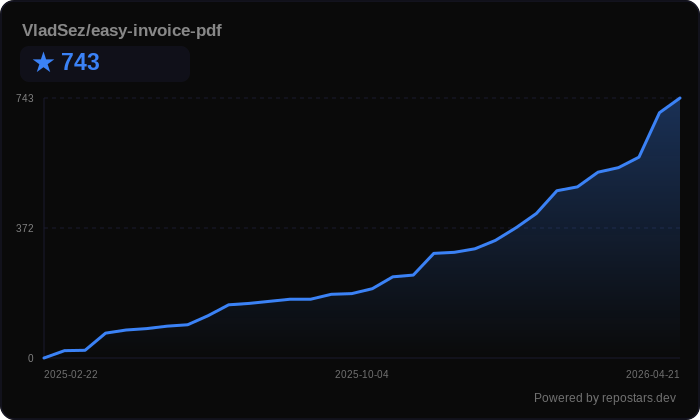](https://repostars.dev/?repos=VladSez%2Feasy-invoice-pdf&theme=dark) ## License EasyInvoicePDF is licensed under the [GNU AGPL v3](https://opensource.org/license/AGPL-3.0).
