项目 / neuml/annotateai
neuml/annotateai
行业候选
语言 Python标签 aiartificial-intelligencelarge-language-modelsllmmachine-learningmedicalnlppythonscientific-paperssearchvector-search数据更新 2026-11-23 06:44:28 · 仓库 2026-11-22
一段话介绍
用大语言模型自动为论文添加批注的工具,重点是在阅读时提供上下文,而不是只做摘要或问答。一次调用会读取论文、找出标题和关键概念,再逐页定位最能体现这些概念的段落,生成简短主题并在文中标注、高亮。可用 `pip install annotateai` 安装,建议使用 Python 3.10 及以上的虚拟环境;底层由 [txtai](https://github.com/neuml/txtai) 支持,可接入其兼容的各类模型。也可用 Docker 镜像 `neuml/annotateai` 启动 Web 应用,默认映射 8501 端口。源文写明对医学和科学论文效果较好,也可处理来自 arXiv、PubMed、bioRxiv 和 medRxiv 的文献。本页按研究与阅读辅助用途介绍,不涉及诊疗判断。
本站整理,非 GitHub 官方 description。
官方 description(GitHub API 原样)📝 Automatically annotate papers using LLMs
官方快照(gh_history.db,2026-11-25):总榜 未进 Top50 · 日榜 未进 Top50 · 周榜未满 7 天基线(官方不生成) · 月榜暂无官方口径;下方四卡为站内趋势聚合(周卡按上榜次数,非官方 7 日增量窗)。
大模型应用工程化与评测
适配系统:AI 应用平台、模型评测平台 · 得分 1.2
提供模型接入、编排与效果评测能力,可作为行业 AI 应用的工程底座与质量闸门。
更多信息
以下三段按该项目自己的 GitHub README 章节摘录(可合理截断并标明);README 没有对应章节的留空,不编造。
我的用法
安装或使用说明见 https://github.com/neuml/txtai。
特点或设计要点
AnnotateAI 只需一行调用即可读取论文、提取标题和关键概念,逐页定位最能体现这些概念的章节并生成简短主题,最后在论文中标注并高亮这些部分。
星标走势还差一天的数据,明天就能看到曲线
每天 10:30 记一次星标,连续两天后自动生成曲线
GitHub 项目主页介绍
来自 GitHub 仓库 README / 主页介绍正文,原样摘录,共 6,366 字节。
<p align="center">
<img src="https://raw.githubusercontent.com/neuml/annotateai/master/logo.png"/>
</p>
<p align="center">
<b>Automatically annotate papers using LLMs</b>
</p>
<p align="center">
<a href="https://github.com/neuml/annotateai/releases">
<img src="https://img.shields.io/github/release/neuml/annotateai.svg?style=flat&color=success" alt="Version"/>
</a>
<a href="https://github.com/neuml/annotateai/releases">
<img src="https://img.shields.io/github/release-date/neuml/annotateai.svg?style=flat&color=blue" alt="GitHub Release Date"/>
</a>
<a href="https://github.com/neuml/annotateai/issues">
<img src="https://img.shields.io/github/issues/neuml/annotateai.svg?style=flat&color=success" alt="GitHub issues"/>
</a>
<a href="https://github.com/neuml/annotateai">
<img src="https://img.shields.io/github/last-commit/neuml/annotateai.svg?style=flat&color=blue" alt="GitHub last commit"/>
</a>
</p>
-------------------------------------------------------------------------------------------------------------------------------------------------------
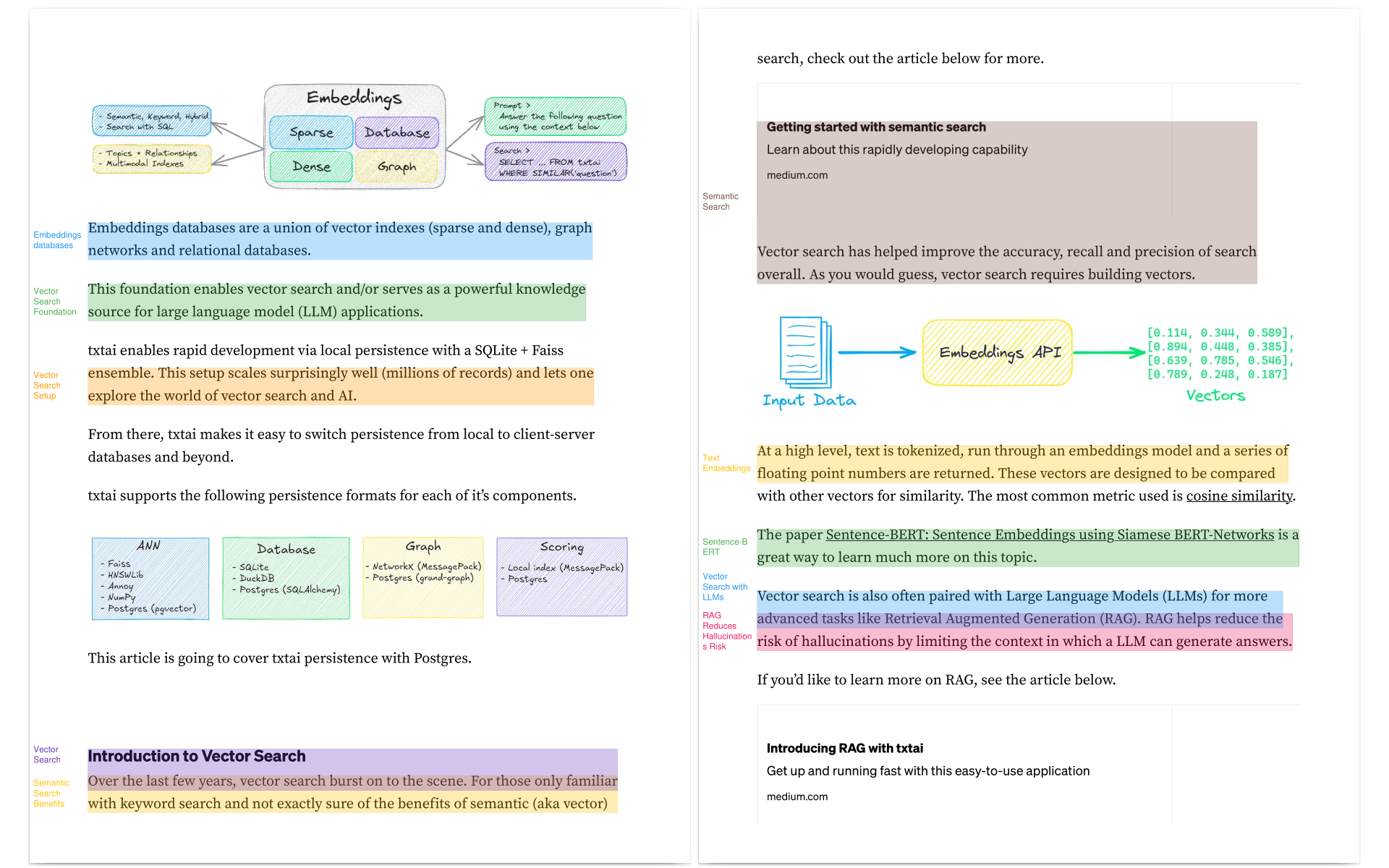
`annotateai` automatically annotates papers using Large Language Models (LLMs). While LLMs can summarize papers, search papers and build generative text about papers, this project focuses on providing human readers with context as they read.
## Architecture
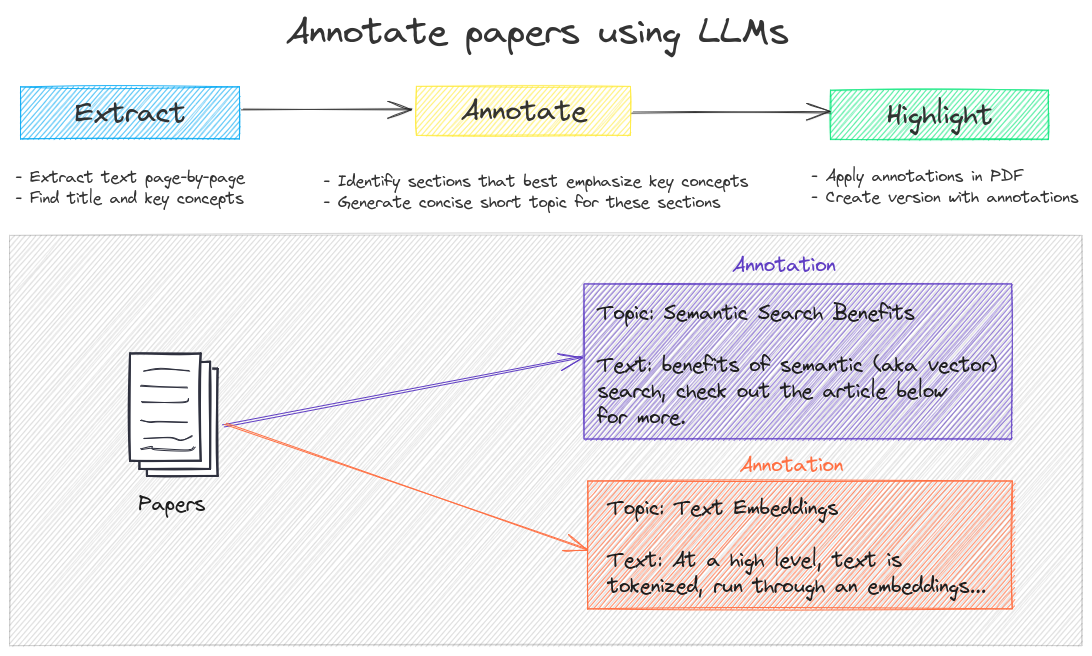
A one-line call does the following:
- Reads the paper
- Finds the title and important key concepts
- Goes through each page and finds sections that best emphasis the key concepts
- Reads the section and builds a concise short topic
- Annotates the paper and highlights those sections
## Installation
The easiest way to install is via pip and PyPI
```
pip install annotateai
```
Python 3.10+ is supported. Using a Python [virtual environment](https://docs.python.org/3/library/venv.html) is recommended.
`annotateai` can also be installed directly from GitHub to access the latest, unreleased features.
```
pip install git+https://github.com/neuml/annotateai
```
## Examples
`annotateai` can annotate any PDF but it works especially well for medical and scientific papers. The following shows a series of examples using papers from [arXiv](https://arxiv.org/).
This project also works well with papers from [PubMed](https://pubmed.ncbi.nlm.nih.gov/), [bioRxiv](https://www.biorxiv.org/) and [medRxiv](https://www.medrxiv.org/)!
### Setup
The primary input parameter is the path to the LLM. This project is backed by [txtai](https://github.com/neuml/txtai) and it supports any [txtai-supported LLM](https://neuml.github.io/txtai/pipeline/text/llm/).
```python
from annotateai import Annotate
# Lightweight but powerful default model
annotate = Annotate("Qwen/Qwen3-4B-Instruct-2507")
# Gemma 4
annotate = Annotate("google/gemma-4-E4B-it")
# llama.cpp version of the above model
# Run pip install llama-cpp-python to enable
annotate = Annotate(
"unsloth/gemma-4-E2B-it-GGUF/gemma-4-E2B-it-Q4_K_M.gguf"
)
```
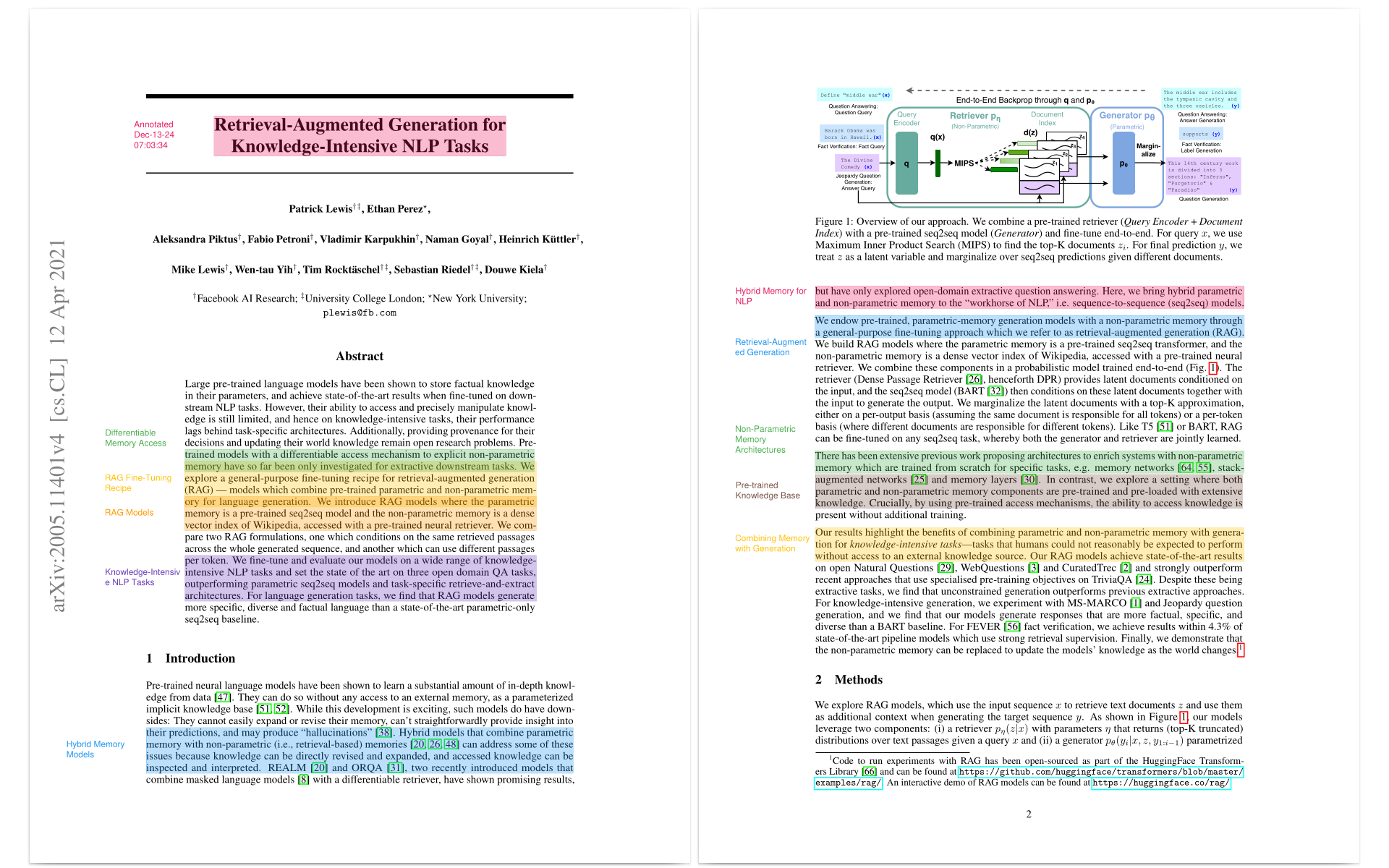
### Annotate paper "Retrieval-Augmented Generation for Knowledge-Intensive NLP Tasks"
This paper proposed RAG before most of us knew we needed it.
```python
annotate("https://arxiv.org/pdf/2005.11401")
```
_Source: https://arxiv.org/pdf/2005.11401_
### Annotate paper "HunyuanVideo: A Systematic Framework For Large Video Generative Models"
This paper builds the largest open-source video generation model as of Dec 2024.
```python
annotate("https://arxiv.org/pdf/2412.03603v2")
```
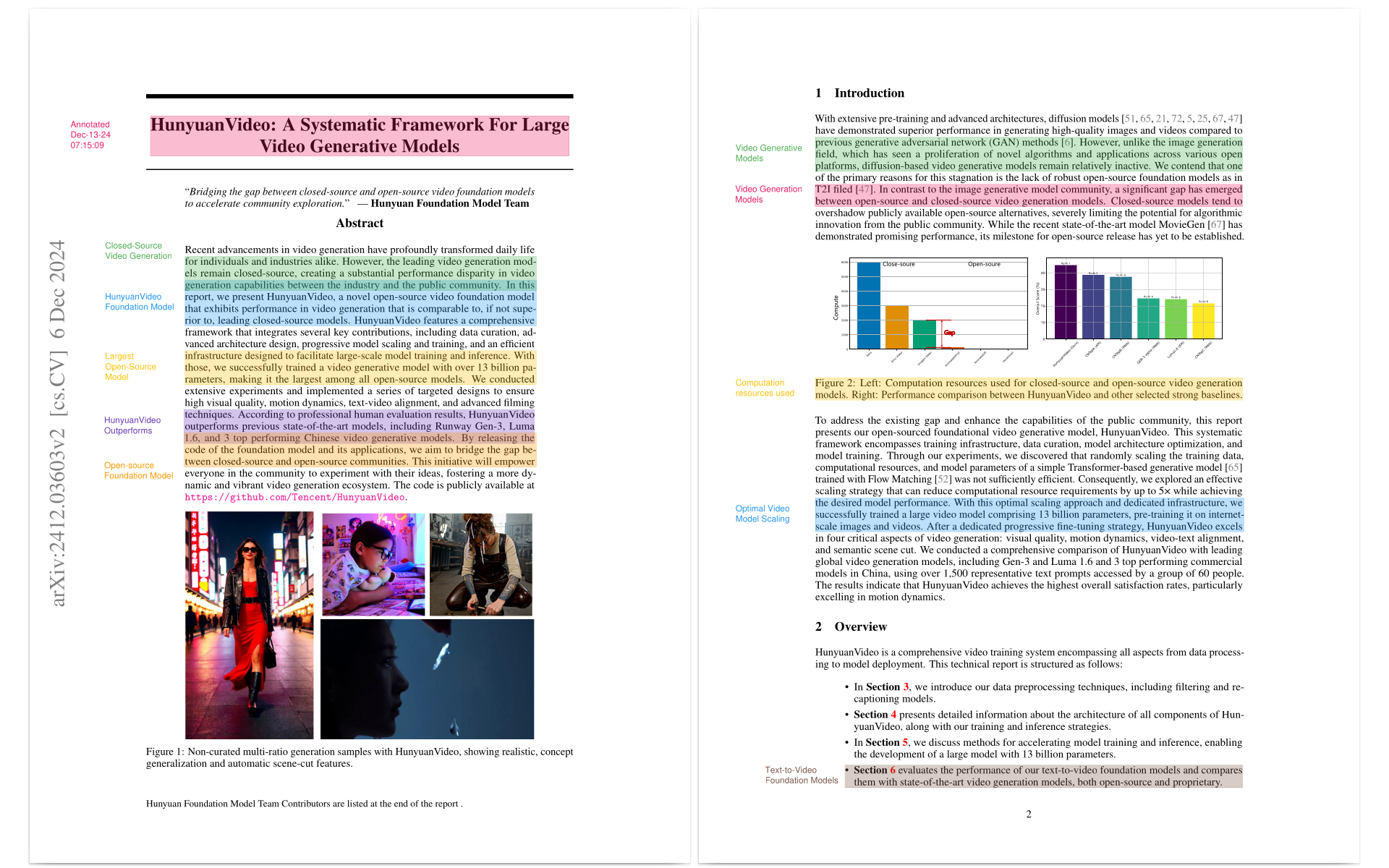
_Source: https://arxiv.org/pdf/2412.03603v2_
### Annotate paper "OpenDebateEvidence: A Massive-Scale Argument Mining and Summarization Dataset"
This paper was presented at the `38th Conference on Neural Information Processing Systems (NeurIPS 2024) Track on Datasets and Benchmarks`.
```python
annotate("https://arxiv.org/pdf/2406.14657")
```
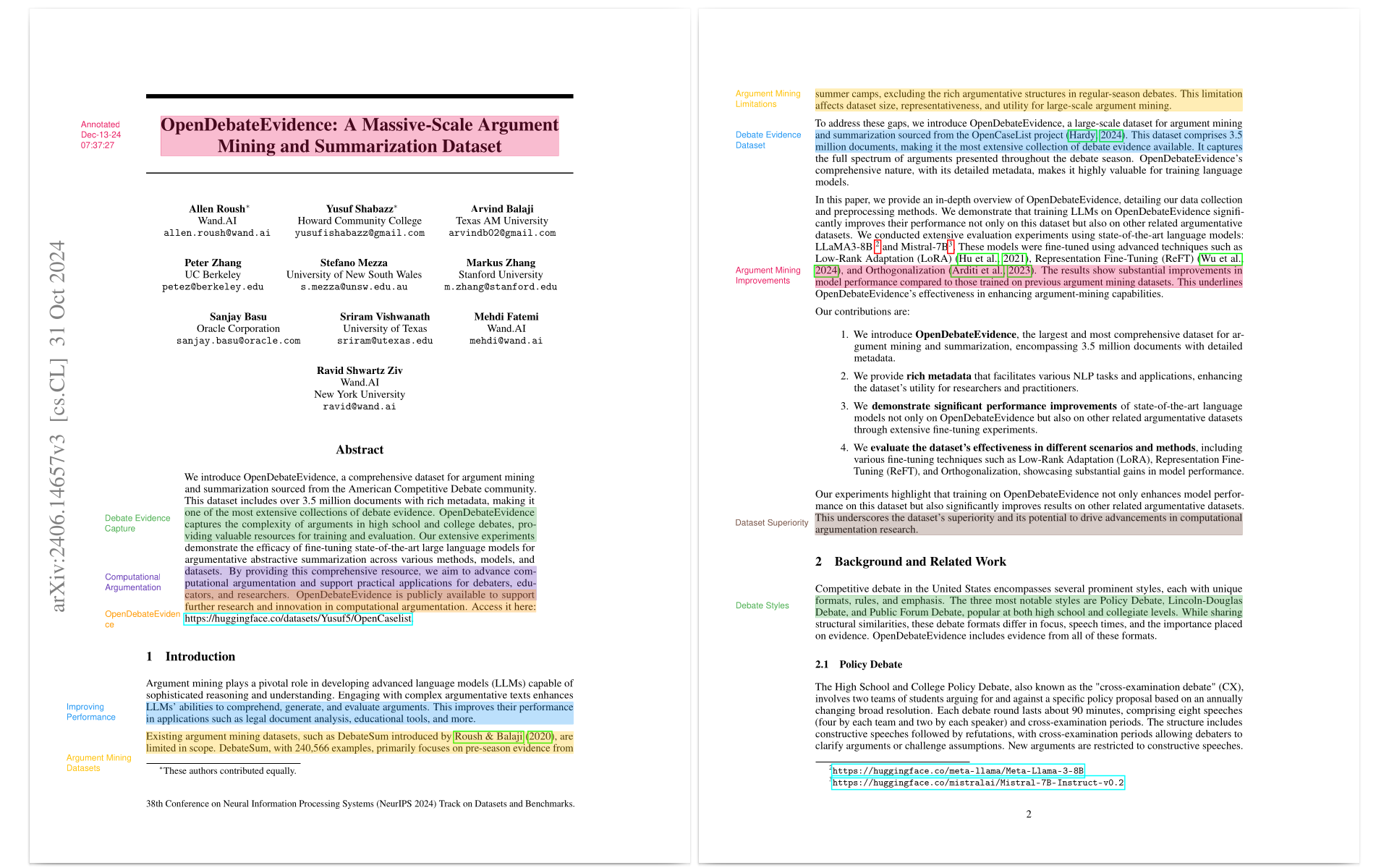
_Source: https://arxiv.org/pdf/2406.14657_
### LLM APIs and llama.cpp
As mentioned earlier, this project supports any [txtai-supported LLM](https://neuml.github.io/txtai/pipeline/text/llm/). Some examples below.
```
pip install txtai[pipeline-llm]
```
```python
# LLM API services
annotate = Annotate("gpt-5.5")
annotate = Annotate("claude-opus-4-6-20260205")
annotate = Annotate("gemini/gemini-3-pro-preview")
# Ollama endpoint
annotate = Annotate("ollama/gemma4")
# llama.cpp GGUF from Hugging Face Hub
annotate = Annotate(
"unsloth/gemma-4-E4B-it-GGUF/gemma-4-E4B-it-Q4_K_M.gguf"
)
```
### Additional parameters
The default mode for an `annotate` instance is to automatically generate the key concepts to search for. But these concepts can be provided via the `keywords` parameter.
```python
annotate("https://arxiv.org/pdf/2005.11401", keywords=["hallucinations", "llm"])
```
This is useful for situations where we have a large batch of papers and we want it to identify a specific set of concepts to help with a review.
The progress bar can be disabled as follows:
```python
annotate("https://arxiv.org/pdf/2005.11401", progress=False)
```
## Docker Web Application
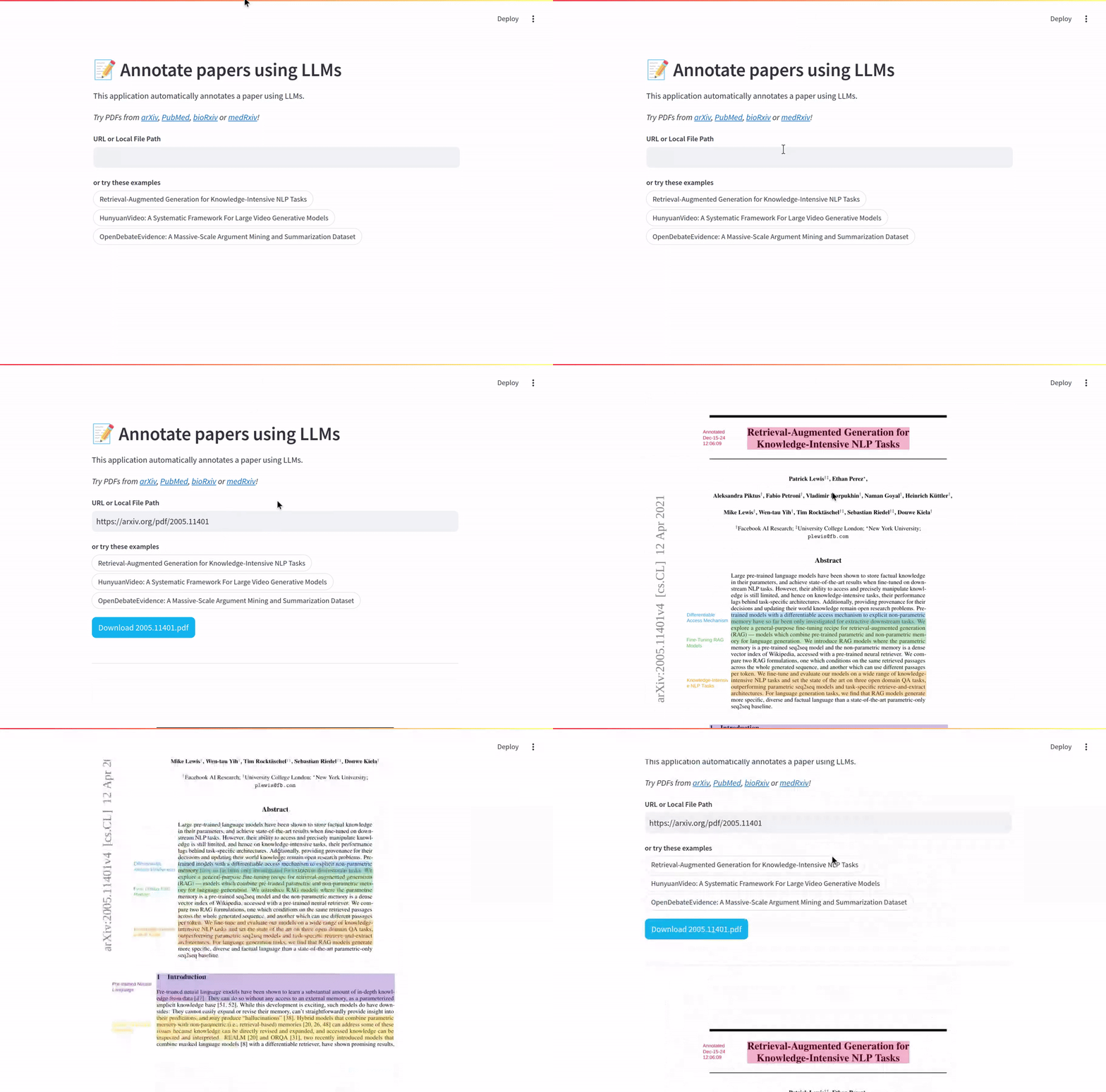
[neuml/annotateai](https://hub.docker.com/r/neuml/annotateai) is a web application available on Docker Hub.
This can be run with the default settings as follows.
```
docker run -d --gpus=all -it -p 8501:8501 neuml/annotateai
```
The LLM can also be set via ENV parameters.
```
docker run -d --gpus=all -it -p 8501:8501 -e LLM=unsloth/gemma-4-E4B-it-GGUF/gemma-4-E4B-it-Q4_K_M.gguf -e MAXLENGTH=10000 -e n_ctx=4096 neuml/annotateai
```
The code for this application can be found in the [app folder](https://github.com/neuml/annotateai/tree/master/app).
## Further Reading
- [Introducing AnnotateAI](https://medium.com/neuml/introducing-annotateai-aecda8851ce5)
