项目 / wmsxwdsh/Profiles2wmsxwdsh
wmsxwdsh/Profiles2wmsxwdsh
行业推荐
语言 —标签 surgequantumult-xsurge4数据更新 2026-11-25 06:49:28 · 仓库 2026-11-24
一段话介绍
搜集多方大神的 Quantumult X / Surge 懒人配置,先学习模仿,后融会贯通,最终为我所用。
本站整理,非 GitHub 官方 description。
官方 description(GitHub API 原样)搜集多方大神的 Quantumult X / Surge 懒人配置,先学习模仿,后融会贯通,最终为我所用。
官方快照(gh_history.db,2026-11-25):总榜 未进 Top50 · 日榜 未进 Top50 · 周榜未满 7 天基线(官方不生成) · 月榜暂无官方口径;下方四卡为站内趋势聚合(周卡按上榜次数,非官方 7 日增量窗)。
库存与供应链协同
适配系统:库存管理系统、供应链协同平台 · 得分 1.4
覆盖库存台账与出入库流程,可作为仓内作业与上下游协同的业务底座。
量化研究与策略回测
适配系统:量化投研平台、行情终端 · 得分 1.4
内置行情接入、因子计算与回测框架,可作为投研团队的策略实验与绩效归因底座。
更多信息
以下三段按该项目自己的 GitHub README 章节摘录(可合理截断并标明);README 没有对应章节的留空,不编造。
我的用法
打开[仓库 README](https://github.com/wmsxwdsh/Profiles2wmsxwdsh),按 Quantumult X 与 Surge 两个栏目查阅这份懒人配置合集,以及作者列出的自用配置入口。本页只介绍合集用途与查阅入口,不介绍具体配置步骤。
特点或设计要点
本仓库收集多方整理的 Quantumult X 与 Surge 懒人配置,README 的定位是先学习模仿,再按自己的需要选用。页面按 Quantumult X 与 Surge 分栏给出多份配置入口,并附有作者自用配置链接;其后还有主页介绍图、自定义图标和 Sub-Store 等补充材料。本页只介绍合集用途与查阅入口,不介绍具体配置或访问步骤。
星标走势还差一天的数据,明天就能看到曲线
每天 10:30 记一次星标,连续两天后自动生成曲线
GitHub 项目主页介绍
来自 GitHub 仓库 README / 主页介绍正文,原样摘录,共 3,280 字节。
# Profiles2wmsxwdsh
<br>
搜集多方大神的 Quantumult X / Surge 懒人配置,先学习模仿,后融会贯通,最终为我所用。
<br/>
Quantumult X 不完全教程:https://www.notion.so/Quantumult-X-1d32ddc6e61c4892ad2ec5ea47f00917
## 一、Quantumult X 懒人配置
Orz-3:https://raw.githubusercontent.com/Orz-3/QuantumultX/master/Orz-3.conf
<br/>
肖大:https://raw.githubusercontent.com/KOP-XIAO/QuantumultX/master/QuantumultX_Profiles.conf
<br/>
毒奶:https://raw.githubusercontent.com/limbopro/Profiles4limbo/main/full.conf
<br/>
Yatta:https://raw.githubusercontent.com/yawenchim/QuantumultX-mix/master/YattaQuanXCDN.conf
<br/>
奇心:https://raw.githubusercontent.com/zwf234/rules/master/QuantumultX/qixin.conf
<br/>
---- 我的:https://raw.githubusercontent.com/wmsxwdsh/Profiles2wmsxwdsh/main/QXwmsxwdsh.conf
## 二、Surge 懒人配置
iOS、macOS,大部分都是通用的。
<br/>
<br/>
Surge 开发者推荐的最小配置: [链接地址有点长,点我直接跳转]( https://gist.githubusercontent.com/Zeaphyou/864aebea248ca1bb8000e0e5623b65f3/raw/c36413c715f43f22772d3c2353358e1ff936b2e6/Surge.conf )
<br/>
Lucky 自用:https://raw.githubusercontent.com/As-Lucky/Lucky/main/Lucky-Surge.conf
<br/>
深巷有喵:https://raw.githubusercontent.com/Rabbit-Spec/Surge/Master/Conf/Spec/Surge.conf
<br/>
---- 我的:https://raw.githubusercontent.com/wmsxwdsh/ClashSub/main/Surge127.conf
## 三、拓展和补充
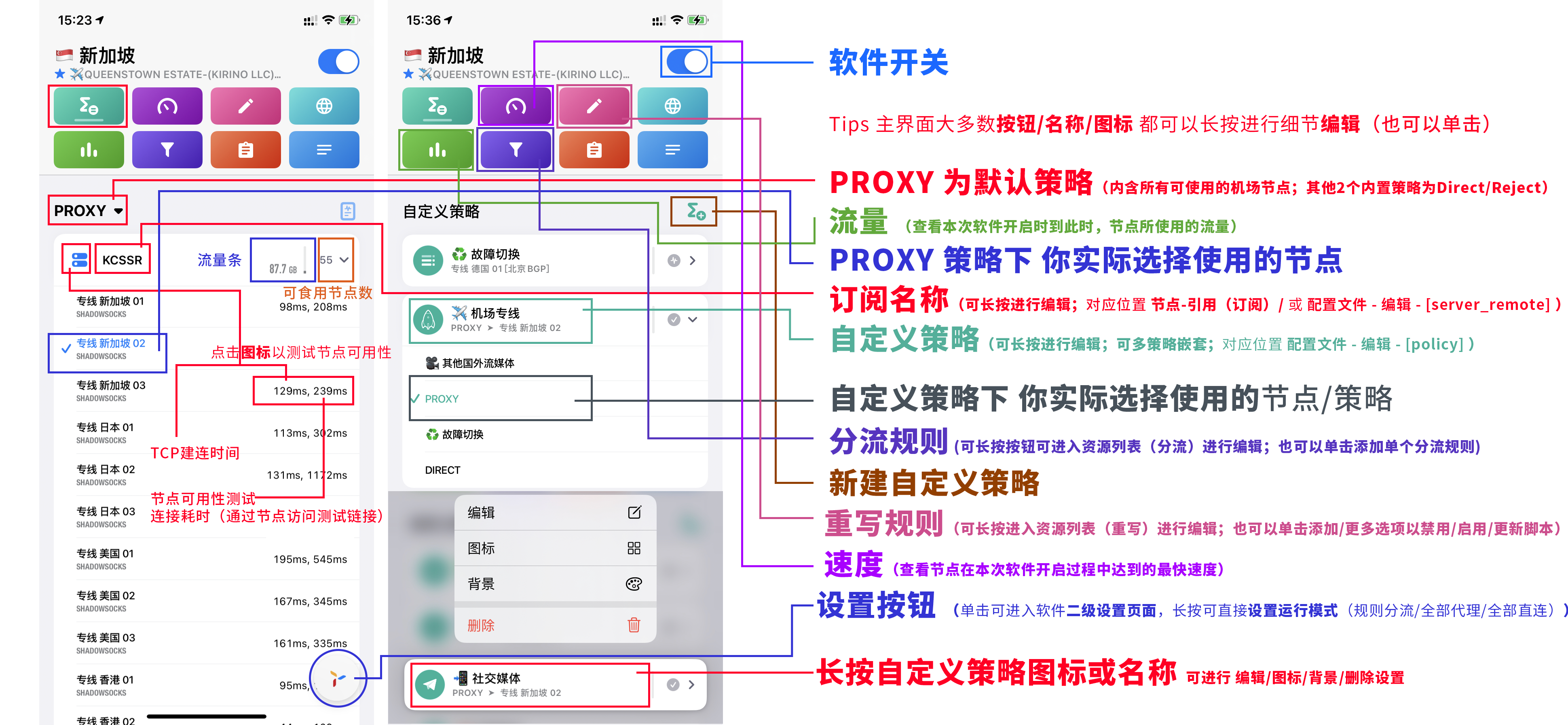
### 1、圈X 主页介绍
### 2、圈X 自定义图标
Qure:https://github.com/Koolson/Qure
<br>
Twoandz9:https://raw.githubusercontent.com/Twoandz9/TheMagic-Icons/main/TheRaw.json
### 3、圈X 解锁 TikTok
传送门:https://github.com/Semporia/TikTok-Unlock
### 4、圈X 本地任务脚本
```text
[task_local]
# > 流媒体解锁查询
event-interaction https://raw.githubusercontent.com/KOP-XIAO/QuantumultX/master/Scripts/streaming-ui-check.js, tag=流媒体解锁查询, img-url=arrowtriangle.right.square.system, enabled=true
# > GeoIP 查询
event-interaction https://raw.githubusercontent.com/KOP-XIAO/QuantumultX/master/Scripts/geo_location.js, tag=GeoIP 查询, img-url=location.fill.viewfinder.system
# > 送中 查询
event-interaction https://raw.githubusercontent.com/KOP-XIAO/QuantumultX/master/Scripts/switch-check-google.js, tag=送中 查询, img-url=https://raw.githubusercontent.com/Yuanxsxs/QtumultX/master/Icon/Catcat/ae49e35adfd291ad.png, enabled=true
# > 请手动添加下面的订阅(流媒体Task订阅集合)
; https://raw.githubusercontent.com/KOP-XIAO/QuantumultX/master/Scripts/UI-Action.json
```
### 5、Sub-Store 教程
传送门:https://www.74110.net/tutorial/app/sub-store/
<br/>
自用的订阅转换:https://github.com/wmsxwdsh/ClashSub
### 6、Shadowrocket 规则
有时候用下小火箭
<br/>
传送门:https://github.com/Johnshall/Shadowrocket-ADBlock-Rules-Forever
## 支持
感谢 [JetBrains](https://www.jetbrains.com/) 提供的工具支持

<br/>
